AI-Powered NGO Management Platform
Philantro AI - NGO Management Platform
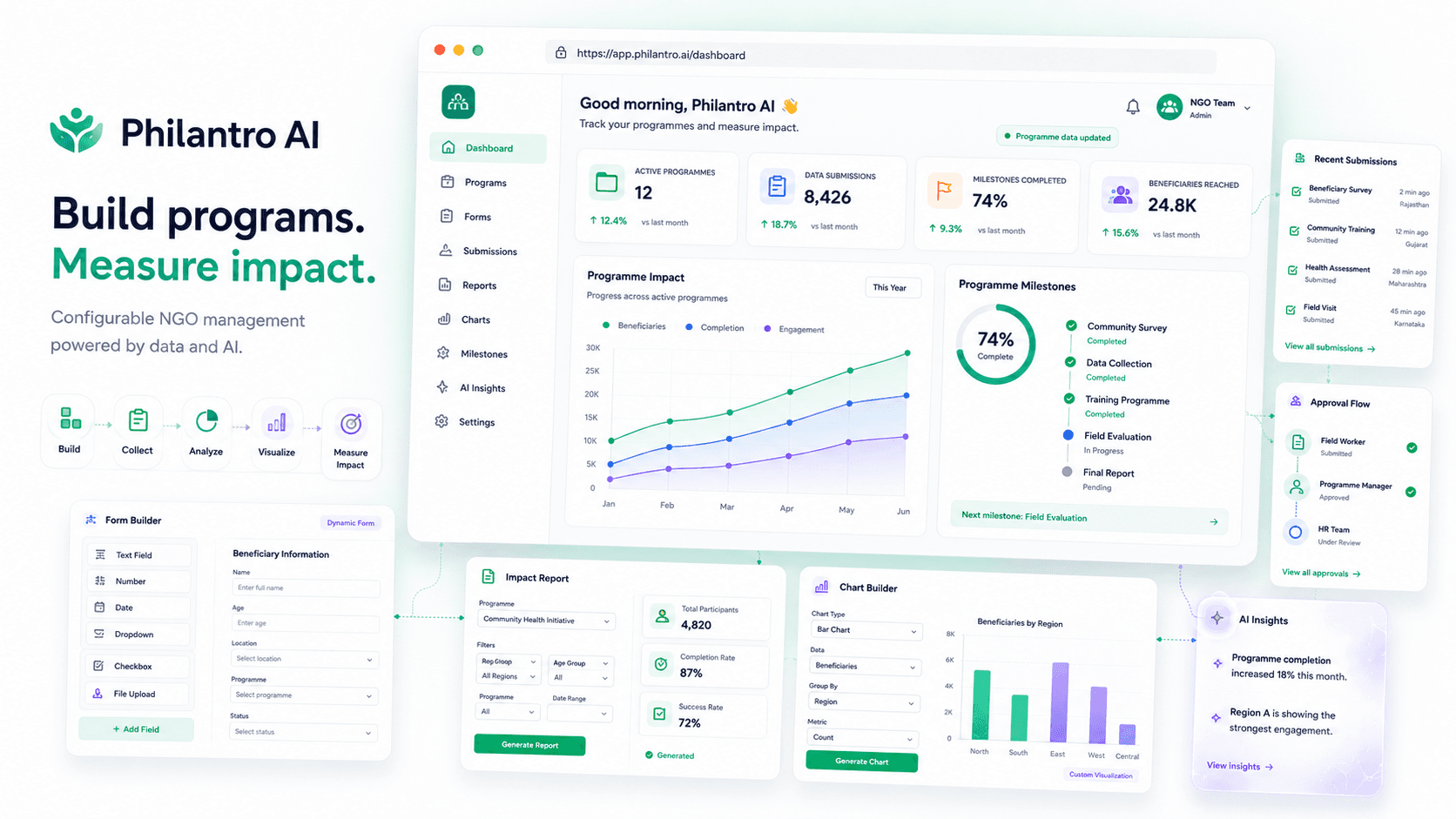
Philantro AI is an NGO management platform. It ships no fixed screens. Instead, each organization builds its own forms, reports, and charts, then tracks progress against milestones. The front end is React with server-side rendering, on a Node.js and MongoDB backend. Part of my work also meant turning AI-assisted design concepts into production React components.
Project Overview
The platform is built to be shaped by the people using it. NGOs work in very different ways. Their programs differ, their reporting rules differ, and progress itself means something different from one group to the next. Hard-coded screens built for one NGO would have been wrong for the next.
So the modules are configurable. There is a form builder for collecting data, dynamic report generation, a chart builder for graphing results, and milestone tracking to follow how a program is going. Each group sets up what it needs and never waits on a developer.
I also worked the design-to-code side. Concepts started as AI-assisted prototypes in Visily, moved into Figma designs, then shipped as production React components with server-side rendering.
My Role
- Built configurable modules in React, including the custom form builder
- Worked on dynamic report generation and the customizable chart builder
- Implemented milestone tracking for program progress
- Developed backend functionality on Node.js and Express with MongoDB
- Set up server-side rendering for the React application
- Collaborated on AI-assisted prototyping, taking Visily concepts through Figma into production components
The Problem
Every NGO collects different information and reports on it differently. Fixed forms and fixed reports would have put a developer in the loop for every small change. A new field, a different breakdown, and someone has to ship code. That does not scale, and it wastes an engineer on routine work. So forms, reports, and charts all had to be configurable by the people using the platform. The catch is that the setup still has to stay structured enough to trust.
How I Built It
The interface is React, rendered on the server so pages arrive as HTML. Nobody waits for JavaScript to build the page first. The backend is Node.js with Express, and MongoDB stores the data.
The form builder is the heart of the platform. A form is not defined in code. It is stored as configuration: its fields, their types, and their rules. The React app reads that configuration and draws the form from it. Adding a field becomes a setting someone changes, not a deployment someone ships.
Reports and charts follow the same idea. Report generation runs off the collected data plus the configuration saying what to summarize. The chart builder then lets a user pick how that output gets graphed. Milestone tracking sits on top, following progress against set checkpoints.
MongoDB suits this well. When users define their own forms, you cannot know the shape of a submission ahead of time. A document store takes that in its stride, while a fixed relational schema would need working around at every turn.
On the design side, concepts began as AI-assisted prototypes in Visily and became Figma designs. From there I built them as production React components, not static mockups handed over the wall.
Key Features
Custom Form Builder
Groups build their own data collection forms by setting fields and rules. The app draws each form from that setup, so a new field needs no code change and no release.
Dynamic Report Generation
Reports build themselves from the collected data and a saved setup, so nobody hand-writes each one. Two groups can pull very different breakdowns out of the same system.
Customizable Chart Builder
Users pick how their own data gets graphed, with no fixed set of charts handed to them. What is worth charting shifts from one program to the next, so that call belongs to them.
Milestone Tracking
Program progress is tracked against set milestones. That gives a clear read on where things stand, so nobody has to work it out from raw submissions.
Server-Side Rendering
Pages render on the server, so content arrives as HTML. On a data-heavy platform that means the first screen is usable sooner.
Technical Architecture
- React Client (SSR)
- Node.js / Express Server
- Configurable Modules (Forms, Reports, Charts, Milestones)
- MongoDB
React renders on the server through Node.js and Express, so pages go out as HTML. The configurable modules sit behind that. Forms, reports, charts, and milestones each read their definitions from stored configuration, never from hard-coded structures. MongoDB holds the configuration and the submitted data together. That works because user-defined forms produce documents with no fixed shape.
Engineering Decisions
Configuration-driven modules over fixed screens
- Why
- Every group needed different fields, reports, and charts. Coding each variation would have pulled a developer into every routine change. Store the definition as configuration and draw the screen from it, and that control moves to the people using the platform.
- Trade-off
- A system that renders from configuration is harder to build and harder to debug than fixed screens. You are building the thing that builds the forms, not the forms.
MongoDB for user-defined data
- Why
- When users define their own forms, submissions have no fixed shape. A document database stores that as it comes. A rigid relational schema would need a workaround for every custom field.
- Trade-off
- You give up the guarantees a relational schema hands you. The database will accept shapes the form never intended, so the app has to do the validating on purpose.
Server-side rendering
- Why
- This is a data-heavy platform people use for real work. Rendering on the server means the page shows up as HTML, so the browser is not assembling it while the user waits.
- Trade-off
- SSR makes both rendering and deployment more involved than a plain client-side app.
Prototyping in Visily and Figma before building
- Why
- Configurable interfaces are far easier to get wrong than fixed ones. Working the ideas through prototypes and Figma first settled the hard questions in design. The alternative is finding them halfway through the React build.
- Trade-off
- It puts a step between idea and code. Rebuilding a form builder after the fact costs far more than redrawing a prototype.
Challenges and Trade-offs
- A configurable system means building the layer that generates the interface, not only the interface. It costs more up front and pays back every time a requirement shifts.
- A flexible data model puts validation on the app. The database stores what it is handed, so every form definition has to carry its own rules.
- Configuration still has to stay structured. Allow too much freedom and the data gets hard to report on, which defeats the point of collecting it.
Technology Stack
Frontend
- React
- SSR
- Tailwind CSS
Backend
- Node.js
- Express.js
Database
- MongoDB
Design
- Visily
- Figma
Outcome
- A configurable NGO management platform with form, report, and chart builders
- Milestone tracking that follows program progress against set checkpoints
- Server-rendered React running on a Node.js and MongoDB backend
- A working path from AI-assisted prototypes through Figma designs to production React components
What I Learned
- Building a configurable system is a different job from building an app. You are designing the rules that generate the interface, and those rules need as much care as any feature.
- Flexible storage moves validation into the application. The database will not catch what the form definition should have.
- Prototyping first pays off for configurable interfaces. The hard questions surface in design, where changing your mind is cheap.
Complex forms, configurable workflows, and admin platforms come up again and again in my work. Review my front-end and platform skills.
This is one of several production platforms I have helped build. See my other client projects.