Real-Time Group Chat
A Real-Time Chat Application Built With Next.js, Node.js, and Raw WebSockets
Messages show up instantly here, with nobody refreshing a page to see them. Someone joins a room, starts typing, and everyone else already in that room sees it land right away. The interface runs on Next.js, the WebSocket server runs on Node.js, and both live inside one Turborepo monorepo so the client and server share the exact same TypeScript types.
You can try the live demo or look through the source code to see how the two sides communicate. This chat app sits among other full-stack and backend projects in the wider portfolio.
Project Overview
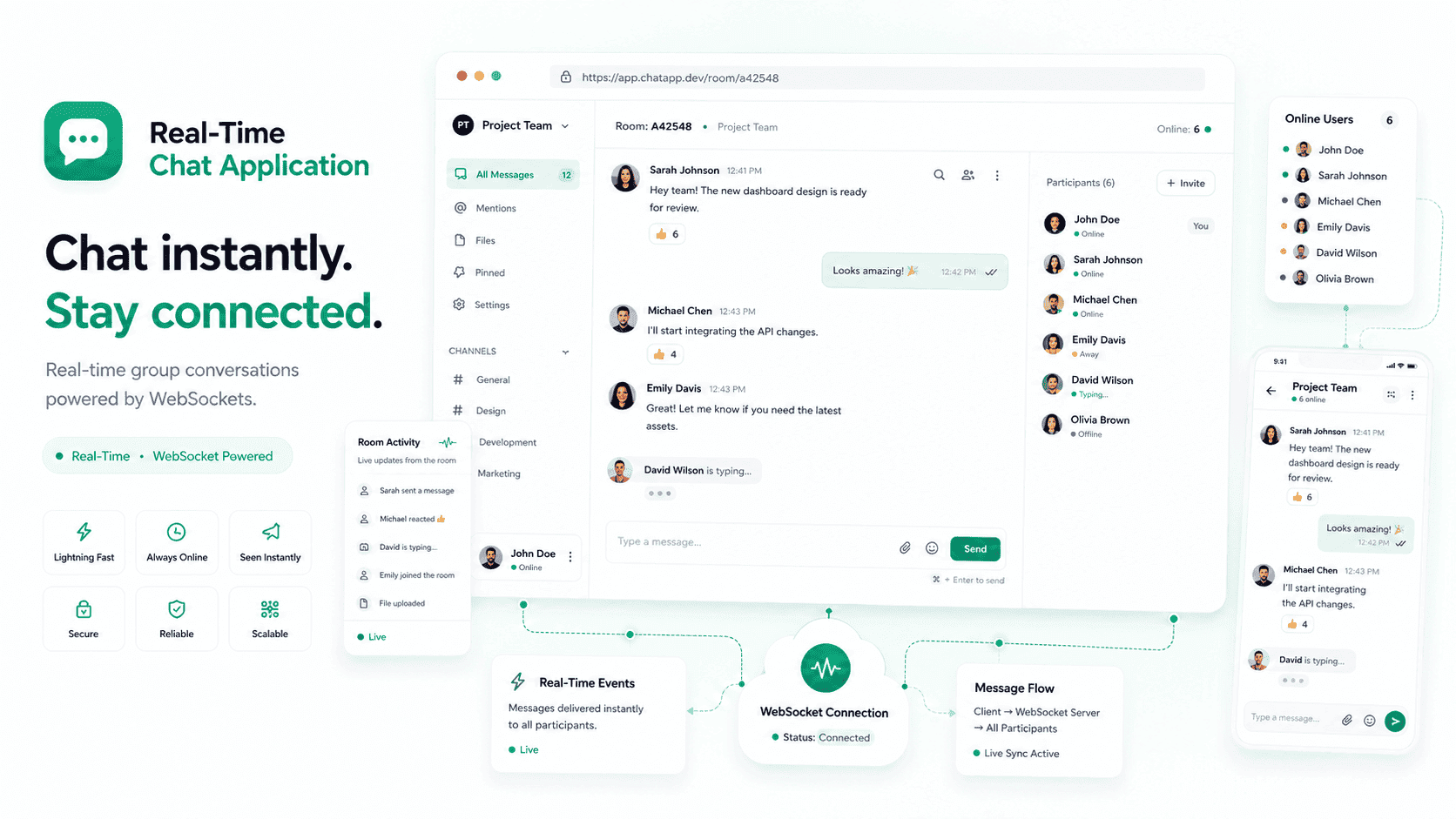
The parts of a messaging app people notice most all get covered here: messages arriving instantly, a small typing indicator when someone's composing a reply, and a seen marker once a message has actually been read. Chat rooms keep conversations separate, so nothing sent in one room ever reaches people sitting in another.
Getting synchronization right is really what made this worth building. You can fake a chat app with polling, where the client just keeps asking the server if anything new happened. Doing real-time messaging properly means the server has to track exactly who's connected, which room each person belongs to, and push updates out the instant something changes. Raw WebSockets were used here instead of a hosted realtime service, so all of that connection and room logic had to be designed and written from scratch.
My Role
- Built the chat interface in Next.js and React
- Wrote the WebSocket server on Node.js and Express
- Designed the socket event names and message payloads
- Set up the Turborepo monorepo and the shared TypeScript types package
- Handled room membership, typing state, and seen status on the server
- Deployed the client and the socket server separately
The Problem
Keeping several people in one room synchronized without a page refresh sounds simple at first glance. In practice, the server needs to know who's currently connected, which room each person sits in, and then push every new message, typing signal, and seen update out to exactly the right people, and nobody else. Building this without leaning on a hosted realtime service was also a deliberate choice. So every bit of connection handling, from someone joining a room to someone quietly dropping off, had to be reasoned through and written by hand rather than delegated to a vendor's SDK.
How I Built It
The repository splits into three pieces: a Next.js app for the interface, a Node.js server handling WebSocket connections, and a small shared package holding the TypeScript types both sides depend on.
When the client loads, it opens a single WebSocket connection and joins a room. From that point on, everything travels over that one connection. Sending a message fires off an event. The server picks it up, figures out who else is in that room, and pushes the message straight to them. Typing indicators and seen status ride along the same connection as small events of their own.
Room state lives in the server's memory: who's connected, who's in which room, and every message sent during the current session. React state on the client just mirrors whatever the server last sent, with new messages appended to the transcript while typing and seen events update small pieces of the interface.
HTTP only ever gets used to load the Next.js app itself. None of the actual chat traffic goes through a REST endpoint. For more on how this fits into my broader backend work, see my Node.js and TypeScript skills and real-time application development skills.
Key Features
Real-time messaging
Messages travel over WebSockets and show up for everyone in the room the second they're sent, no polling and no refresh required anywhere.
Chat rooms
Conversations stay scoped to individual rooms. The server tracks membership and only routes events to people who actually belong there.
Typing indicators
When someone starts typing, everyone else in the room finds out immediately. It's a small signal that carries a lot of weight; without it, a chat can feel sluggish even when the connection itself is fine.
Seen status and read receipts
Read state gets shared between participants, so you can actually tell whether a message landed and was read, the same way most modern messaging apps handle it.
Shared message types
Event names and payload shapes live in one shared TypeScript package that both sides import. Change a payload on either end, and the other side simply stops compiling. Nothing fails silently once this ships.
Responsive interface
Built with Tailwind CSS, it works cleanly on desktop and mobile without a separate native app.
Technical Architecture
- Next.js client
- WebSocket connection
- Node.js and Express server
- Room and event logic
- In-memory session state
The frontend and backend run as genuinely separate apps here. The Next.js client renders everything and holds local React state, while keeping one persistent WebSocket connection open to the Node.js server at all times. Roughly, it flows like this: the Next.js client opens a WebSocket connection to a Node.js and Express server, which owns room and event logic and keeps session state entirely in memory. That Node.js server owns every connection, tracks room membership, and routes each event to the right people. Session data, meaning who's connected and what's been sent so far, lives only in that server's memory. It keeps the whole system easy to reason about, with one clear limitation: everything belongs to a single server process.
Engineering Decisions
Raw WebSockets over a hosted realtime service
- Why
- Going with raw WebSockets instead of a hosted realtime service came down to the feature set being genuinely small: messages, typing, and seen status. There was also real value in understanding connection handling firsthand rather than delegating it to a vendor SDK, since writing it directly meant full control over event names, payloads, and what actually happens when someone joins or leaves.
- Trade-off
- The trade-off is that a hosted service would have handled reconnection and scaling automatically. Here, running a second server instance would need shared state or a pub/sub layer connecting them.
A monorepo with shared TypeScript types
- Why
- Using a monorepo with shared TypeScript types made sense because the client and server talk constantly, and their message shapes have to match exactly. One shared package means a change on either side gets caught at compile time instead of discovered later in production logs.
- Trade-off
- It costs a bit more setup than two separate repos, and Turborepo itself is one more tool to learn, but it's worth it. Mismatched payloads between a client and a socket server are miserable to debug once they're already live.
Keeping room state in memory
- Why
- Keeping room state in memory, rather than in a database, comes from how constantly chat events fire. Writing every message and typing signal to a database adds a round trip to something that's supposed to feel instant, and this project never needed history to survive a restart anyway.
- Trade-off
- The obvious downside: restart the server, and every room empties out. Fine for a demo. Real persistence would mean a database write on every message and a history load on every room join.
A display name instead of full authentication
- Why
- Skipping full authentication in favor of a simple display name kept the focus on the actual interesting problem, synchronization, rather than accounts. Asking only for a name and a room lets anyone open the demo immediately.
- Trade-off
- Nothing here verifies who someone actually claims to be, though, so a real deployment would need a proper auth layer before going anywhere near real users.
Challenges and Trade-offs
- The connection lifecycle needed the most care of anything in this build. People open second tabs, close them without warning, and drop off wifi constantly. Handle joins and leaves sloppily, and rooms quietly fill up with people who technically left ages ago.
- In-memory state made development fast, and it also means nothing survives a server restart. That was a deliberate limit built into the project from the start, not something that slipped through unnoticed.
- There's one WebSocket connection per client currently, with no reconnection backoff in place. On a flaky network, a production deployment would need to retry with growing delays instead of hammering the server every time a connection drops.
Technology Stack
Frontend
- Next.js
- React
- TypeScript
- Tailwind CSS
Backend
- Node.js
- Express.js
- WebSockets
Tooling
- Turborepo
- shared TypeScript package
Deployment
- Vercel
- Node.js host
Outcome
- A working chat application with rooms, typing indicators, and seen status.
- A public demo running the Next.js client against a deployed socket server.
- A defined event contract shared between client and server packages.
- And an architecture that stays genuinely readable: two apps, one shared types package.
What I Learned
- Realtime bugs are almost always connection bugs. Very little of what I ran into was actually about messages themselves; it was about what happens when someone drops off without any warning at all.
- Sharing types between client and server catches an entire category of mistake before the code ever runs, which matters enormously in something as fast-moving as real-time chat.
- Keeping state in memory is a completely fair trade as long as you're honest about the cost. Here, that cost is chat history that doesn't survive a restart.
Frequently Asked Questions
How does a real-time chat app actually stay in sync?
It relies on a persistent connection, usually a WebSocket, between the client and server, rather than repeatedly checking for new data. The server tracks who's connected and which room they're in, then pushes new messages, typing signals, and read status out the moment something changes.
Why WebSockets instead of REST for chat?
A WebSocket keeps one open connection between client and server, so messages push instantly in both directions. REST would mean the client constantly asking whether anything new arrived, which adds delay. That's the core difference between a chat app that feels instant and one that feels laggy.
How do typing indicators and read receipts work here?
They're small events sent over the same WebSocket connection as chat messages themselves. When someone starts typing or reads a message, the server broadcasts that update to everyone else in the room, which is what makes the app feel responsive rather than static.
Why keep chat state in memory instead of a database?
Writing to a database on every message adds a round trip to something meant to feel instant, and this project never needed persistence across restarts. The trade-off is that state disappears on restart, which is fine for a demo but would need a real persistence layer in production.
Next.js, TypeScript, Node.js, and WebSockets show up across most of the work I take on. Check my Node.js and TypeScript skills.
This is one of several full-stack and backend builds in the portfolio. See what else I've worked on.
Or check the real-time application development services.