Premium Personal Expense Tracker
Velnora: A Personal Expense Tracker With Budget Tracking and CSV Import
Most expense trackers fail in one of two ways. Either logging a purchase takes too long and people give up within a week, or the app opens to an empty screen when months of real spending history already sit in a bank statement. Velnora was built to avoid both problems.
It's a personal expense tracker where you log spending, set a monthly budget, and watch a dashboard tell you where the money actually went. Rather than asking you to retype months of transactions, it reads directly from CSV and Excel files. You can try the live demo yourself, and this build sits among other full-stack work in the project portfolio.
Project Overview
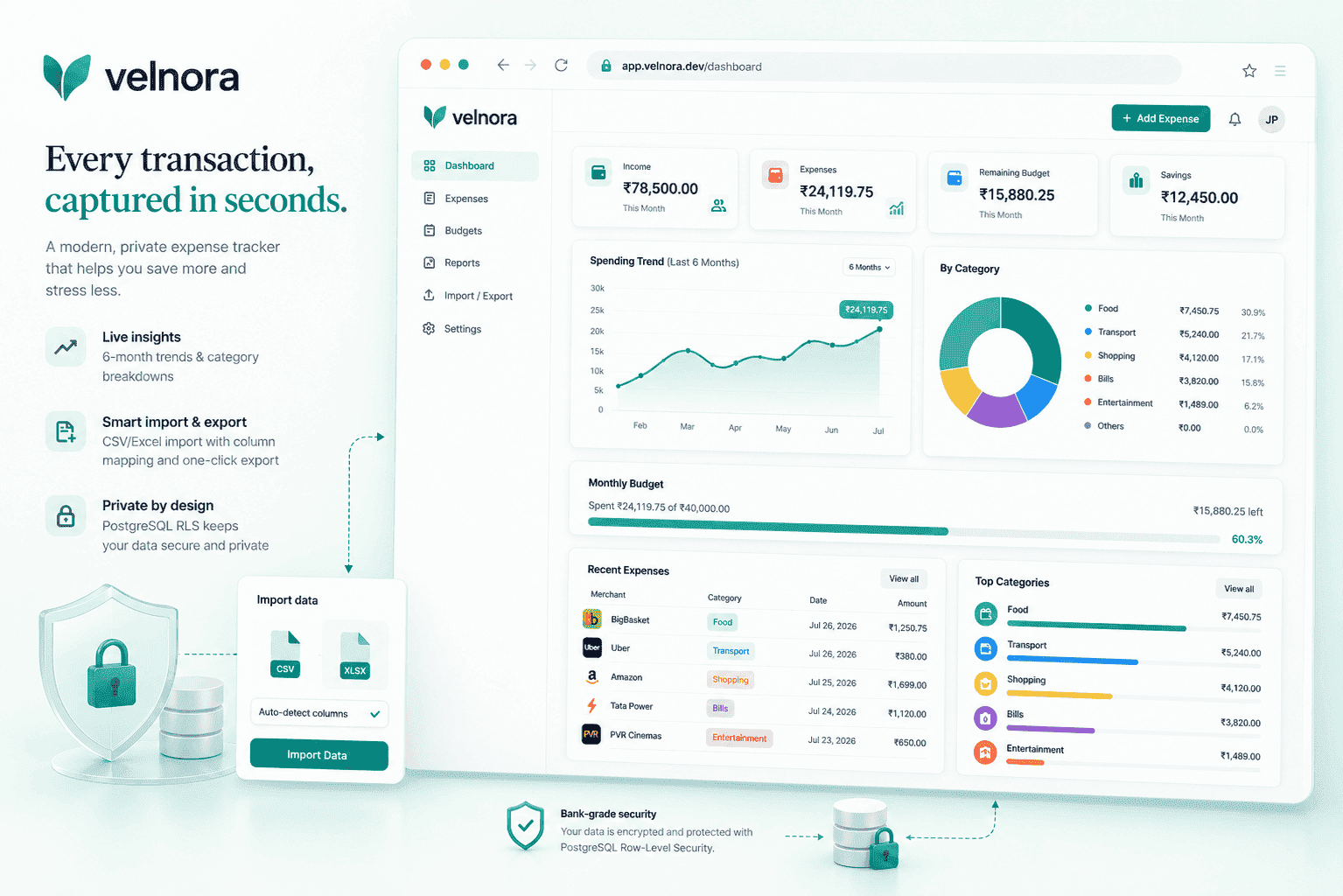
At its core, this is a single dashboard app. Open it and you see your total spend for the month, a six-month trend line, and a category breakdown, all in one view. Adding a new entry takes a few seconds, which matters more than it sounds. A budget tracker that feels like a chore stops getting opened.
The bigger piece of engineering here is import. Nobody wants to manually enter six months of coffee purchases. Velnora reads bank exports in CSV or Excel format and lets you map each file's columns to its own fields, since no two banks label their data the same way. Export mirrors that logic in reverse: whatever you've filtered on screen is exactly what downloads.
Privacy shaped almost every decision on the backend. Financial data is intimate, so instead of trusting application code to filter results correctly every time, the database itself refuses to hand back anyone else's rows. That protection lives in PostgreSQL directly, through row-level security.
My Role
- Built the application with TanStack Start and React
- Designed the dashboard, including the trend and category charts in Recharts
- Built the CSV and Excel import flow with column mapping
- Set up Supabase Auth and the PostgreSQL row-level security policies
- Handled server state and caching with TanStack Query
- Added Zod schema validation for form input and imported rows
The Problem
Two failure modes kill most spending trackers before they get used. Friction is the first: if logging a coffee run takes thirty seconds of fumbling, people quit within days. The blank slate is the second: opening a new app to nothing, when your actual spending history already exists somewhere else, is discouraging enough that many people never bother importing it. Solving both meant building fast entry alongside a real import path, and doing it without ever risking one account seeing another's numbers. That last part wasn't optional. Expense data is the kind of thing a single careless query could expose, and that's not a mistake worth making twice.
How I Built It
TanStack Start handles routing and the app shell here, while React builds the actual screens and Tailwind CSS styles them. TanStack Query owns anything fetched from the server, caching results and quietly refetching in the background, so adding an expense updates the dashboard without a full page reload.
Supabase runs both authentication and the PostgreSQL database underneath. Instead of writing a user filter into every single query by hand, the access rules live directly on the database tables as row-level security policies. Ask for expenses, and Postgres only ever returns your own. That check happens before any application code even touches the response.
Column mapping happens at import time rather than asking users to clean up a spreadsheet first. Every bank formats its export differently, so a rigid parser built for one bank would simply break on the next file someone uploaded. Zod validates both paths, form entries and imported rows, against one shared schema, catching malformed data before it ever reaches the database. If you're curious how this kind of PostgreSQL-backed React work fits into my broader stack, my React development skills and PostgreSQL and database design skills cover more of it.
Key Features
Quick expense logging
A short form, a few seconds, done. The whole point is removing any excuse to skip an entry.
Monthly budgets
A raw total tells you very little on its own. The same number placed next to a budget limit tells you whether to ease off or keep spending as planned.
CSV and Excel import with column mapping
Bring in an existing bank export and map its headers to Velnora's fields as part of the upload, no manual spreadsheet cleanup needed beforehand.
Filtered export
Whatever filter is active on the dashboard is exactly what lands in your downloaded file, whether that's one category or a specific date range.
Dashboard charts
Recharts draws the monthly total, the six-month trend, and the category split. A single month rarely tells a story on its own; the trend is what actually earns attention here.
Row-level data isolation
PostgreSQL enforces privacy at the database layer, not inside application logic, so the rule holds no matter which part of the app is making the request.
Technical Architecture
- TanStack Start and React
- TanStack Query
- Supabase client
- Supabase Auth plus row-level security
- PostgreSQL
There's no separate backend service running behind this app. TanStack Start talks to Supabase directly, with TanStack Query sitting in between as a caching layer so the dashboard isn't refetching every dataset on every keystroke. Supabase authenticates each request and tags it with the signed-in user's identity, and PostgreSQL's row-level security policies decide which rows come back. The flow looks roughly like this: TanStack Start and React on the client, TanStack Query managing server state, the Supabase client handling requests, Supabase Auth plus row-level security enforcing access, and PostgreSQL underneath storing everything.
Engineering Decisions
Row-level security over filtering in application code
- Why
- Filtering by user inside application code sounds simple until you realize every query becomes a fresh opportunity to forget that filter. Putting the rule on the table itself means PostgreSQL enforces it once, automatically, for every query that touches those rows going forward.
- Trade-off
- The downside is that this kind of policy is harder to spot than a visible filter in the code; you have to know to check the database schema to understand why a particular query behaved a certain way. Given how personal this data is, that trade felt worth making without much hesitation.
Supabase over a custom backend
- Why
- Choosing Supabase over building a custom backend came down to needing exactly three things: authentication, a relational database, and per-user access control. Supabase covers all three, and row-level security meant there was no separate API layer to design or maintain.
- Trade-off
- The cost is a tighter coupling to Supabase's client and its particular conventions. If this project ever outgrows what a database policy can express, some of that logic will eventually need to move into a dedicated backend service.
Column mapping during import
- Why
- Asking users to map columns during import, rather than expecting a perfectly formatted spreadsheet, adds one extra step to the process.
- Trade-off
- But skipping that step would mean most real bank exports simply fail to import, since no two banks agree on what to call their own columns.
Zod validation for forms and imports
- Why
- Zod validation exists because data arrives from two very different places: a typed form, which is predictable, and an uploaded spreadsheet, which almost never is. One shared schema checks both before anything touches the database.
- Trade-off
- The trade-off is that these schemas live apart from the actual database schema, so keeping the two in sync is a manual, ongoing task.
Challenges and Trade-offs
- Real bank exports are messy in ways a hand-typed form never is. Blank cells, three different date formats in the same file, dollar amounts stored as plain text instead of numbers. Catching all of that during import, rather than trying to clean it up later on the dashboard, turned out to matter more than any single UI decision.
- Skipping a custom backend works fine right up until some piece of logic doesn't fit neatly into a database policy. That's a known ceiling on this architecture, not something the current setup quietly solves. And Velnora itself is still evolving. Features are being reworked as I go, so treat this as a snapshot rather than a finished product.
Technology Stack
Frontend
- TanStack Start
- React
- TypeScript
- Tailwind CSS
Data and state
- TanStack Query
- Zod
Backend
- Supabase
- PostgreSQL
- row-level security
Charts
- Recharts
Outcome
- The result is a working expense tracker with fast logging, real monthly budgets, and a dashboard people can actually read at a glance.
- CSV and Excel import handles messy real-world bank data, filtered export gets you exactly what you asked for, and per-account isolation is guaranteed at the database layer rather than hoped for in application code.
- A live demo is up and running if you want to poke at it directly.
What I Learned
- Database-level access rules eliminate an entire category of bug before it can happen, since every single query inherits the rule automatically rather than relying on a developer to remember it each time.
- Import is where real data actually gets difficult. Handling messy spreadsheets properly took more careful thought than the entire dashboard combined, which wasn't what I expected going in.
- Skipping a dedicated backend is a reasonable call when the security boundary already lives somewhere solid, like a database. It just sets a ceiling on how far complex logic can go before something has to change.
Frequently Asked Questions
What does Velnora actually track?
Velnora tracks personal spending against a monthly budget, showing totals, a six-month trend, and a category breakdown on one dashboard. It also imports existing spending history from CSV or Excel bank exports, so you're not starting from a blank slate.
How does the CSV and Excel import handle different bank formats?
Since banks rarely use the same column headers, Velnora asks you to map each file's columns to its own fields during import. That single mapping step means the same import flow works across different banks without needing a separate parser for each one.
Is my expense data private from other users?
Yes. Velnora uses PostgreSQL row-level security, which enforces data isolation inside the database itself rather than in application code. That means a query can only ever return the signed-in user's own rows, regardless of which part of the app made the request.
What's the tech stack behind Velnora?
Velnora runs on TanStack Start and React on the frontend, styled with Tailwind CSS, with TanStack Query managing server state. The backend is Supabase and PostgreSQL, with Zod handling validation for both form input and imported spreadsheet rows.
This kind of data-heavy React interface running on PostgreSQL comes up often in my work. Take a look at my React skills.
Velnora sits next to several other full-stack apps and APIs in the broader archive. Browse the full project list.
Or check the full-stack web development services.