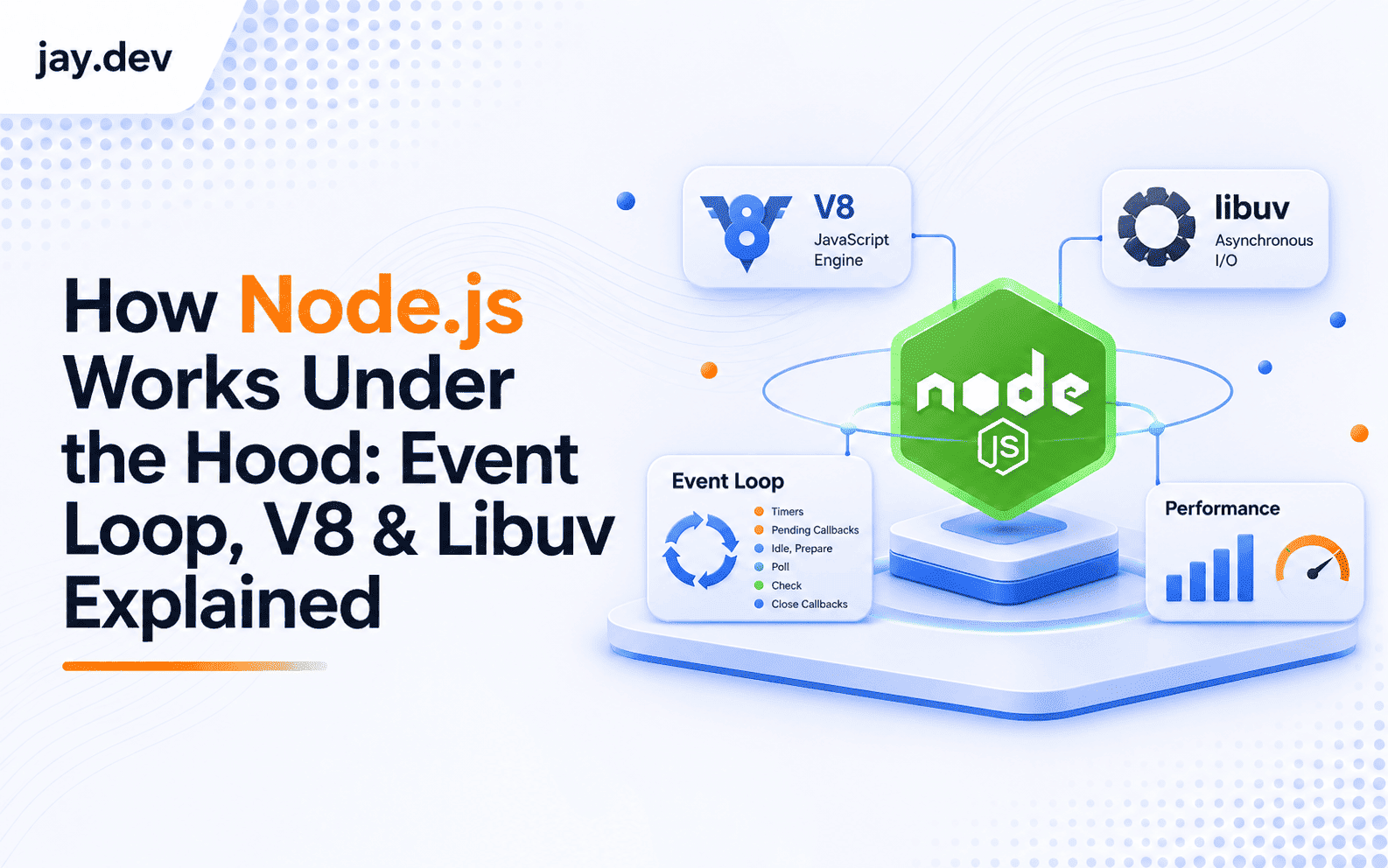
“Node.js works internally by combining the V8 engine, libuv, and the event loop. V8 runs your JavaScript, libuv handles async I/O and threads, and the event loop schedules callbacks, so one thread serves many requests.”
Node.js looks simple from the outside. You write a few lines of JavaScript, start a server, and it handles thousands of requests. The real work happens deep inside the runtime. To understand how Node.js works internally, you need to know three parts: the V8 engine, libuv, and the Node.js event loop. These components work together to make up the foundation of Node.js..
This topic matters more than ever. In the 2025 Stack Overflow Developer Survey, 48.7% of developers said they use Node.js, which made it the most used web technology in the survey. Node.js 26 also became the Long Term Support line on October 28, 2026, and it will receive updates until April 2029. So the runtime is here to stay, and it pays to learn how it handles work.
This guide is a technical follow-up to my beginner post, What is Node.js?. That post explains what Node.js is and why teams choose it. Here I go one level deeper. I show how a request moves through the runtime, why one thread can serve many users, and where developers slow things down by accident. I use plain examples and small code samples so you can run everything yourself.
Node.js Architecture: The Big Picture
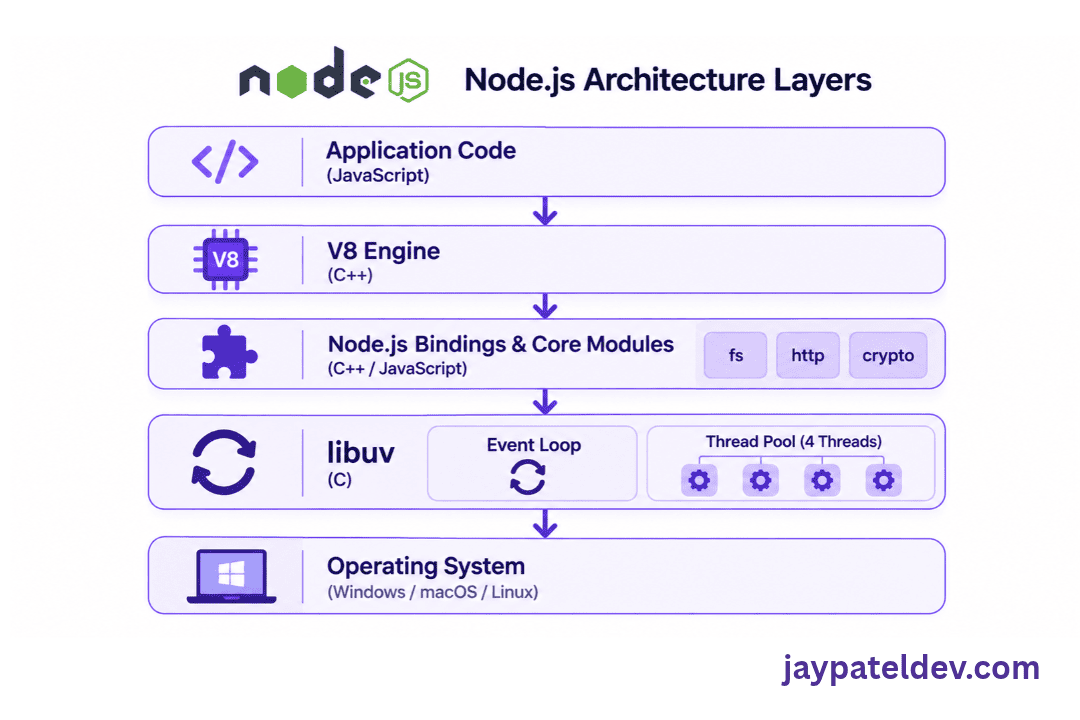
Node.js architecture is a layered design where your JavaScript runs on the V8 engine, native C++ bindings connect it to the system, and libuv manages asynchronous I/O through the event loop and a thread pool. This design lets a single JavaScript thread handle many connections without waiting on slow tasks like file reads or network calls.
To make this concept easier to understand, let's use a restaurant as an example. V8 is the chef who cooks one dish at a time. Libuv is the kitchen staff who handle slow jobs like baking or chilling. The event loop is the waiter who watches the clock, picks up finished dishes, and brings the next order to the chef. The chef never stands still waiting for the oven, and that is the whole idea behind the runtime.
The Four Layers of Node.js Architecture
Each layer has one clear job. This table shows how the four parts of the runtime fit together and what each one is responsible for.
| Layer | Written in | Main job |
|---|---|---|
| Your application code | JavaScript | Business logic, routes, and callbacks |
| V8 engine | C++ | Compiles and runs JavaScript |
| Node.js bindings and core modules | C++ and JavaScript | Connect JavaScript to the system through modules like fs, http, and crypto |
| libuv | C | Event loop, async I/O, and thread pool |
Notice that the event loop does not live inside V8. This surprises many developers. V8 only runs JavaScript. The event loop comes from libuv, and Node.js wires the two together. Browsers build their own event loop, so the two environments behave in similar but not identical ways.
Why the Node.js Architecture Uses a Single Thread
Node.js runs your JavaScript on one main thread. That sounds like a weakness, but it removes a whole class of problems. There are no locks to manage, no race conditions on shared variables, and no cost for switching threads on each request. Most of the time in an API, a chat server, or a dashboard is spent waiting for data. A single thread that never waits can serve thousands of sockets.
The trade-off is clear. If one callback runs for a long time, every other request waits behind it. I have seen a large JSON.parse() call freeze a small API for a full second. Nothing was broken. The thread was simply busy. The later sections show how to avoid this.
This model also explains why Node.js fits JavaScript-based stacks so well. In MERN stack development projects, the same language runs from the server to the browser, and the same event-driven thinking applies to both sides.
How the V8 Engine Runs Your JavaScript
The V8 is a JavaScript engine developed by Google, originally for Chrome. Node.js uses this engine to execute JavaScript code directly on your machine, without needing a browser. Node.js 26 ships with V8 14.6, which is part of Chromium 146. V8 reads your source, turns it into instructions a computer understands, and runs them fast.
V8 Engine Compilation: Ignition and TurboFan
V8 does not interpret your code line by line forever. It uses a pipeline instead. First, the parser turns your source into an abstract syntax tree. Next, the Ignition interpreter converts that tree into bytecode and starts running it right away. While the code runs, V8 watches which functions are used often. These hot functions go to TurboFan, the optimizing compiler, which turns them into fast machine code. Newer V8 versions add mid-tier compilers, such as Sparkplug and Maglev, between those two steps.
This is why the first call of a function can be slower than the thousandth call. V8 learns from how your code behaves. If a function always receives numbers, V8 makes it fast for numbers. If you suddenly pass a string, V8 may throw away the optimized version and fall back to slower code. Keeping your data types consistent helps V8 help you.
Memory and Garbage Collection in the V8 Engine
V8 manages two main memory areas for your code, and understanding both helps you debug slow functions and memory leaks in production Node.js apps.
- Call stack: Tracks which function is running right now. Each call adds a frame and each return removes one. Too many nested calls cause a stack overflow.
- Heap: Stores objects, arrays, and closures. The garbage collector frees heap memory when nothing refers to an object anymore.
V8 splits the heap into a young generation and an old generation. New objects start in the young generation, which is cleaned often and quickly. Objects that survive move to the old generation, which is cleaned less often. Large heaps with many long-lived objects make garbage collection pauses longer. You can raise the limit with the --max-old-space-size flag, but fixing the leak is always better than raising the limit.
Libuv: The Engine Behind Node.js Async I/O
Libuv is a C library built for Node.js. It gives the runtime a cross-platform way to handle files, sockets, timers, and child processes. On Linux it uses epoll, on macOS it uses kqueue, and on Windows it uses IOCP. Your code does not change between systems because libuv hides those differences.
What Libuv Does in the Node.js Architecture
Libuv sits between Node.js and the operating system. These are the main jobs it takes care of while your JavaScript keeps running.
- Runs the Node.js event loop and tracks every pending callback.
- Talks to the operating system for network sockets, using non-blocking calls where the system supports them.
- Runs file system work, DNS lookups, and some crypto and compression tasks on a thread pool.
- Manages timers, child processes, and signal handling.
A common myth says that Node.js is single-threaded in every way. That is not true. Your JavaScript is single-threaded, but libuv uses real threads in the background. Network I/O usually goes straight to the kernel, so it needs no thread at all. File reads and some heavy tasks go to the pool.
The Libuv Thread Pool and UV_THREADPOOL_SIZE
By default, libuv creates a pool of four threads. If you start six slow crypto tasks at once, the first four run together and the other two wait in a queue. You can change the size with the UV_THREADPOOL_SIZE environment variable. The example below hashes six passwords at the same time.
const crypto = require('node:crypto');const start = Date.now(); for (let i = 1; i <= 6; i++) { crypto.pbkdf2('secret', 'salt', 100000, 64, 'sha512', () => { console.log(`Hash ${i} finished after ${Date.now() - start} ms`); }); }Run it normally and you will see the hashes finish in two groups. Run it with UV_THREADPOOL_SIZE=8 node threadpool.js and all six finish close together, as long as your machine has enough CPU cores. More threads do not always mean more speed. If you set the number higher than your core count, tasks just compete for CPU time.
This kind of queueing matters in API-heavy projects, such as a social media backend API, where password hashing and file handling can compete for the same threads.
The Node.js Event Loop Explained
The Node.js event loop is the loop that decides what runs next. It lets Node.js do non-blocking I/O even though your JavaScript runs on one thread. When an async task finishes, its callback waits in a queue. The event loop picks callbacks from those queues in a fixed order and sends them to V8 to run. When every queue is empty and nothing is pending, the process exits.
Node.js Event Loop Phases in Order
The loop moves through six phases in every cycle. Each phase has its own first-in, first-out queue of callbacks. The list below shows them.
- Timers: Runs callbacks from setTimeout() and setInterval() whose time has passed.
- Pending callbacks: Runs some deferred system callbacks, such as certain TCP errors.
- Idle, prepare: Used only inside Node.js. Your code never touches this phase.
- Poll: Collects new I/O events and runs their callbacks. The loop may wait here when there is nothing else to do.
- Check: Runs setImmediate() callbacks right after polling.
- Close callbacks: Runs cleanup callbacks, such as a socket close event.
Between every callback, Node.js also drains the microtask queues. That detail is where many bugs hide, so I explain it next.
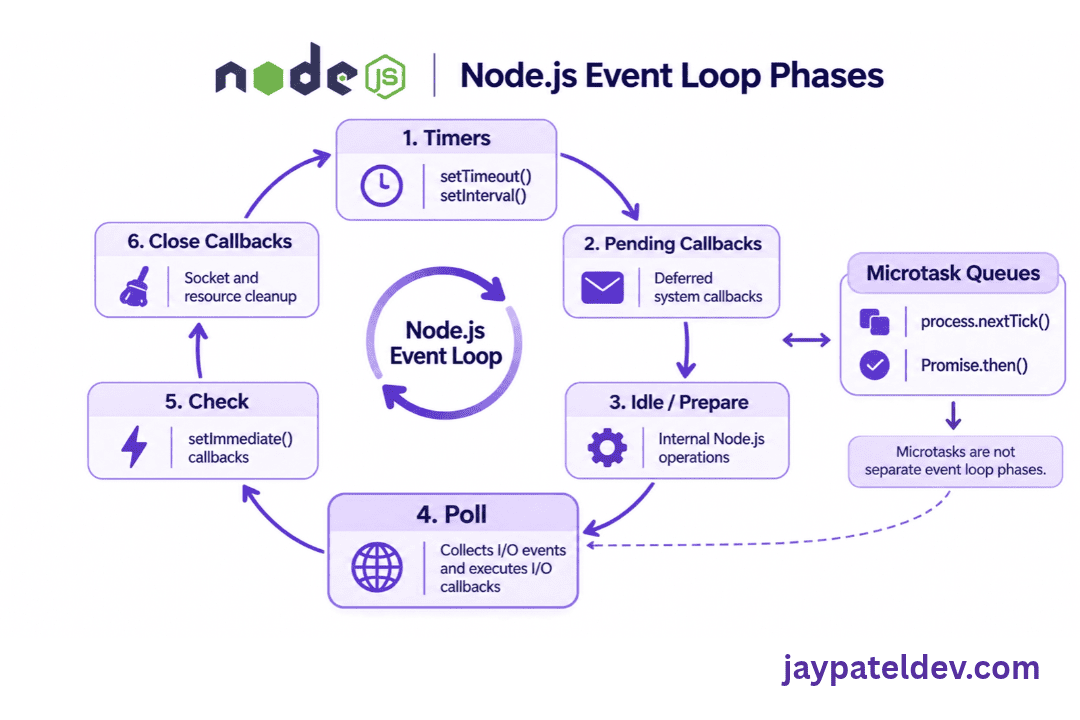
The poll phase is where a network app spends most of its time. In a real-time chat application, the loop waits for socket data and runs message handlers as soon as they arrive. That is why keeping each handler short matters so much.
Microtasks in the Node.js Event Loop
Microtasks are small jobs that run between phases, not inside them. Node.js has two microtask queues. The first holds process.nextTick() callbacks. The second holds callbacks from resolved promises. After each callback finishes, Node.js runs all nextTick callbacks first, then all promise callbacks, before it moves on. Because of this, a long chain of microtasks can block the loop just like heavy synchronous code.
console.log('sync start'); setTimeout(() => console.log('setTimeout'), 0); setImmediate(() => console.log('setImmediate')); Promise.resolve().then(() => console.log('promise')); process.nextTick(() => console.log('nextTick')); console.log('sync end');You will always see sync start, sync end, nextTick, and promise in that order. The timeout and immediate callbacks come after them. In the main module, the order of those last two can change between runs, because it depends on how fast the process starts.
setTimeout vs setImmediate in the Node.js Event Loop
Inside an I/O callback, the order becomes predictable. The loop is already in the poll phase, so the check phase comes next, and setImmediate() runs first every time.
const fs = require('node:fs'); fs.readFile(__filename, () => { setTimeout(() => console.log('timeout'), 0); setImmediate(() => console.log('immediate')); });Use setImmediate() when you want to run code right after the current I/O step. Use setTimeout() when you need a real delay. This small difference is a favorite interview question, and it shows whether a developer understands the phases or only memorized the API.
How Node.js Works Internally: Following One Request
Imagine a client calls an API route that reads a user profile. This is the path the request takes inside the runtime, start to finish.
- The operating system receives the TCP connection, and libuv sees a new event in the poll phase.
- Node.js parses the HTTP request and calls your route handler inside V8.
- Your handler calls an async function, such as fs.readFile() or a database driver. The call returns right away.
- Libuv sends the job to the operating system or to its thread pool. The main thread is free again and can serve other requests.
- When the job finishes, libuv places the callback in a queue.
- The event loop picks up the callback in the right phase and passes it to V8.
- Your callback builds the response, and Node.js writes it back to the socket.
The key idea is that your JavaScript never waits. It starts work, hands it off, and moves on. This is the core of how Node.js works internally. It also explains why the same design supports REST and GraphQL APIs equally well, a topic I compare in REST vs GraphQL in 2026.
Common Mistakes That Block the Node.js Event Loop
Most performance problems in Node.js come from a few repeated habits. These are the ones I check first when an API feels slow.
- Sync methods in request handlers:fs.readFileSync() blocks every user while it reads.
- Heavy loops and large JSON work: Big JSON.parse() or JSON.stringify() calls freeze the thread.
- Complex regular expressions: A badly written pattern can take seconds on certain input.
- Endless microtask chains: Recursive process.nextTick() calls can starve I/O.
- Overusing the thread pool: Too many crypto or file tasks fill the four threads and delay everything else.
Keeping the Node.js Event Loop Free With Worker Threads
When you must do CPU-heavy work, move it off the main thread. Worker threads run JavaScript in a separate thread with its own V8 instance and its own event loop. The example below calculates a Fibonacci number without blocking the main thread.
const { Worker, isMainThread, parentPort, workerData } = require('node:worker_threads'); if (isMainThread) { const worker = new Worker(__filename, { workerData: 40 }); worker.on('message', (result) => console.log('Result:', result)); } else { const fib = (n) => (n < 2 ? n : fib(n - 1) + fib(n - 2)); parentPort.postMessage(fib(workerData)); }For scaling across CPU cores, run one Node.js process per core with the cluster module or a process manager. Each process has its own event loop. Worker threads fit CPU tasks inside one app, while clustering fits handling more connections at once. Many production systems use both.
Why This Knowledge Helps in Real Projects
Knowing the Node.js architecture changes how you design software. You stop guessing why an endpoint is slow and start reading the runtime. You choose streams over big buffers. You keep CPU work away from request handlers. You size the thread pool with real data. These habits matter most in production systems, where small delays add up quickly.
It also helps when you choose tools. Express and NestJS both sit on top of the same runtime, so they share the same event loop behavior. If you want to see how they differ in structure and scale, read NestJS vs Express.js in 2026.
If you are planning a new API or service, these runtime details shape the design from day one. My backend development services cover APIs, databases, and background jobs built on this foundation, and the skills page lists the full toolset I work with.
Frequently asked questions
Topics
- #Node.js
- #Node.js Architecture
- #Event Loop
- #V8 Engine
- #Libuv
- #Backend Development
- #JavaScript